One connected grid for every restaurant workflow.
DineGrid connects front counter, tables, online customers, kitchen, stock room, finance, and organization controls without giving every role access to everything.
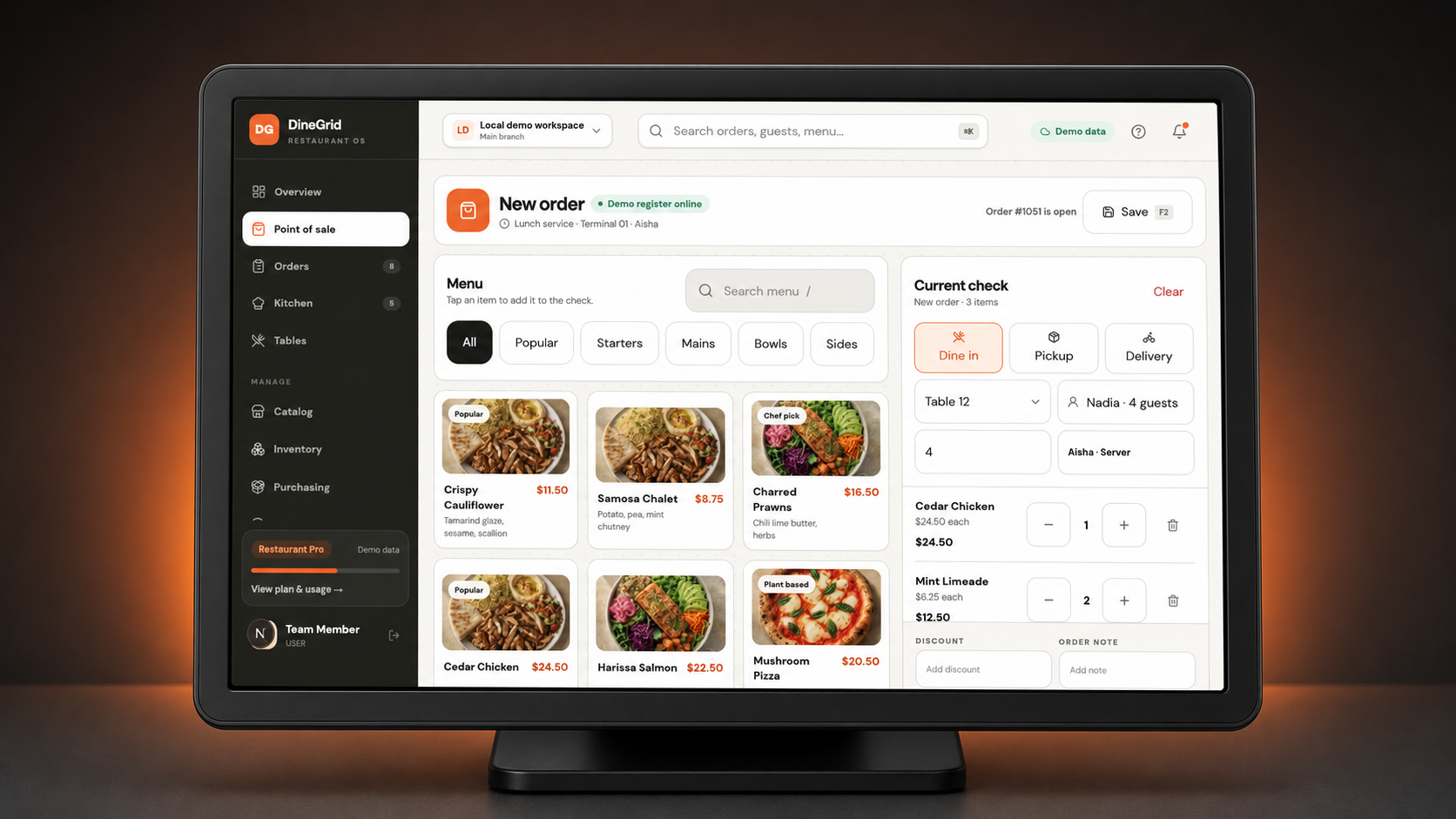
The active order and next action stay in view.
A persistent order sits beside categories, search, and large product tiles. Required modifiers guide the next action; Save, Send, and Pay stay reachable on touch terminals and collapse into a focused handheld flow on smaller screens.
Book a POS walkthroughLive product grid
Category navigation and menu search
Required modifier validation
Mixed and partial payments
Visible offline and API sync status
Keyboard-ready controls
Stock moves when the order does.
Connect menu sales to ingredients, purchasing, physical counts, waste, transfers, and production without running a separate inventory ledger beside the POS.
POS-linked recipe depletion
Map a menu item directly to stock or publish an ingredient recipe. Sending the POS order consumes the correct quantities with exact unit conversion and recipe waste factors.
Locations, lots, and costing
Track on-hand, reserved, and available quantities by branch, storage location, bin, and lot using weighted-average, FIFO, or standard costing.
Count and variance control
Run blind or visible count sessions, compare expected and counted quantities, record variance reasons, then review, approve, and apply the result.
Purchase orders and receiving
Manage suppliers and purchase orders through approval, ordering, partial receiving, actual unit costs, lot expiry, and supplier-invoice match status.
Waste, transfers, and production
Approve waste, move stock between branches with shipment and receipt controls, and complete production batches for prep or central-kitchen workflows.
Low-stock and audit visibility
Set item reorder thresholds, surface low-stock items, and retain a scoped movement trail while permissions keep cashier and stock-room access separate.
Clearly separated roadmap
These workflows are not represented as available today.
- RoadmapActual-versus-theoretical food cost and live menu-margin reporting
- RoadmapInvoice OCR, accounting sync, and vendor payments
- RoadmapPurchasing budgets, vendor price comparison, and predictive ordering
Features that follow the order from sale to close.
Available capabilities and planned additions are separated clearly, so your rollout starts with what DineGrid supports today.
Touch-first POS
- Large product tiles, category navigation, search, modifiers, discounts, order save/send controls, and mixed or partial payment captures.
Kitchen & queue
- Kitchen ticket status, elapsed timers, item-level preparation updates, order-ready status, and a public queue board.
- RoadmapAdvanced station and expo routing is on the roadmap.
Printer routing setup
- Configure receipt and kitchen profiles, 58/80 mm paper widths, branch/station/category rules, and fallbacks.
- RoadmapDurable print execution and reprints are roadmap capabilities.
Inventory & purchasing
- Track balances, costs, locations, bins, lots, suppliers, purchase orders, receiving, and reorder thresholds.
- Publish ingredient recipes for POS depletion, run count and waste approvals, transfer stock between branches, and complete production batches.
Online store & QR
- Publish a branded catalog with modifiers, guest QR ordering, order tracking, and queue status.
- RoadmapStructural templates and digital receipts are on the roadmap.
Teams & permissions
- Owners, admins, managers, cashiers, waiters, kitchen and stock teams with branch, screen, and action-level controls.
Customers & loyalty
- Manage customer profiles, consent, order history, loyalty rules, and points.
- RoadmapRestaurant promotions, gift cards, and store credit are on the roadmap.
Reports & daily close
- Review branch sales, tax, discounts, refunds, tenders, channels, items, hourly activity, CSV exports, and immutable daily-close snapshots.
- RoadmapConsolidated organization reporting is on the roadmap.
The same operating core, shaped around your service model.
Use the same guided setup to record your business model, region, branches, and fulfillment modes. Your selected package then gates workspace screens, actions, and usage limits.
Food carts & pop-ups
Public QR catalog, order numbers, pay-at-counter, and a live pickup queue without restaurant complexity.
Cafes & quick service
Fast touchscreen billing, modifiers, kitchen tickets, tender records, and low-stock visibility.
Table service
Set up dining areas, tables, reservations, and a waitlist, then follow kitchen ticket status and elapsed time.
Cloud & multi-branch
Control branch access, roles, and screen permissions while reviewing sales and daily-close reports for each branch.
A clear path from first setup to daily close.
Every tenant completes the same guided business, region, and branch setup. After setup, the selected package entitlements determine which workspace screens, actions, and usage limits are available.
Set up the business
Choose a package, then configure branches, taxes, fulfillment modes, and brand settings.
Prepare operations
Publish the catalog, invite staff, assign roles, and configure registers, printer routes, tables, or queues.
Sell and fulfill
Accept POS, QR, and online guest orders through the shared order and kitchen-ticket lifecycle.
Close and improve
Reconcile drawers and tender records, review stock balances, export branch reports, and record daily close.
See the workflows your team needs in one guided demo.
Start a guided 14-day trial or let us walk through the right setup for your business, devices, printers, and branches.